This is the only article you need to find the best workout app. Whether you want a gym logger, a cardio app, or something geared more toward general fitness, we’ve got you covered.
The 7 Best Workout Apps in 2026
Here is a brief overview and comparison.
| App | Best For | Rating (App Store) | Rating (Google Play) | Free Version | Paid Tier Cost* |
|---|---|---|---|---|---|
| Hevy | Detailed set-by-set logging, gym progress tracking & social features | 4.9 | 4.9 | Yes, very functional | $2.99/month $23.99/year $74.99/lifetime |
| Strava | Detailed cardio logging with GPS, exploring routes & social features | 4.8 | 4.5 | Yes, very functional | $7.99/month $49.99/year |
| BetterMe | Beginner pilates, flexible exercise schedules & healthy meal ideas | 4.7 | 4.5 | Yes, with access to a few features | $9.99/week $19.99/month $53.99/6 months $99/year |
| Nike Training Club | Bodyweight and limited-equipment workouts with guidance | 4.8 | 4.4 | Yes, very functional | Free with a Nike Membership |
| Zwift | Gamified indoor cardio workouts, including solo, group, and live | 4.7 | 4.4 | No, but there is a 14-day free trial | €19.99/month €199.99/year |
| StretchIt | Dedicated stretching and mobility work with goals & guidance | 4.8 | 4.2 | No, but there is a 7-day free trial | $19.99/month $159.99/year |
| Centr | Dynamic workouts for all levels with guidance and meal plans | 4.8 | 4.7 | No, but there is a 7-day free trial | $29.99/month $79.99/quarter $152.99/year |
*The price may vary based on region and local currency.
TL;DR: How to Pick the Best App For You
- You want a simple, intuitive, and flexible gym/weight-training tracker with a fully functional free version? Download Hevy.
- Lift weights, but also want to do the occasional cardio workout? Pair Hevy with Strava (or Zwift for indoor running or cycling).
- Prefer follow-along workouts at home without planning anything? Nike Training Club or BetterMe.
- Want to improve flexibility alongside your structured training? StretchIt (along with Hevy for gym training or Strava/Zwift for cardio).
- You want to do and track outdoor cardio activities like hikes, runs, and bike rides? Strava is a solid option.
- You prefer flexible, minimal-equipment, dynamic workouts with nutrition and mindfulness guidance? Try Centr.
Continue reading for an in-depth breakdown of each app.
1. Hevy: Best Gym Logger/Strength Training App
Included in Free Version
- Log unlimited workouts
- Access workout tools, such as:
- RPE logging
- Plate calculator
- Automatic rest timer
- Supersets
- Set types
- Live PR notifications
- Exercise notes
- Have up to four saved workout routines (templates) in your profile
- Store up to seven custom exercises
- Access the whole exercise library
- Access workout data from up to three months back:
- Muscle distribution
- Performance on individual lifts
- Exercises done most often
- Save workouts and training plans from the routine library
- See a monthly report/summary of your training
- Log body weight and waist size, and add progress photos
- Follow others, build a following, comment, and like workouts
- Integrate with Strava and Apple Health or Health Connect
- Integrate your Hevy profile with ChatGPT
Paid Version Unlocks
- Store unlimited workout routines in your library
- Create and store unlimited custom exercises
- Access complete training data and graphs
- Look at the set count per muscle group data
- Access the warm-up set calculator
- Log all circumference measurements and body fat %
Available On
- iOS
- Android
- Apple Watch
- WearOS
Integrations
- Strava
- Apple Health
- Health Connect
- ChatGPT
Workout Types
The focus is on traditional strength/gym workouts, but you can also log home/travel sessions, cardio, sports, HIIT, and more.
Training Programs Included
Yes, a full library of workout splits based on experience, goals, available equipment, and preferred training frequency.
There are also eight individual workout categories, including at-home, travel, dumbbell-only, and bodyweight.
One-off Workouts
Yes, log any gym, bodyweight, cardio, or sports activity.
Workout Tools
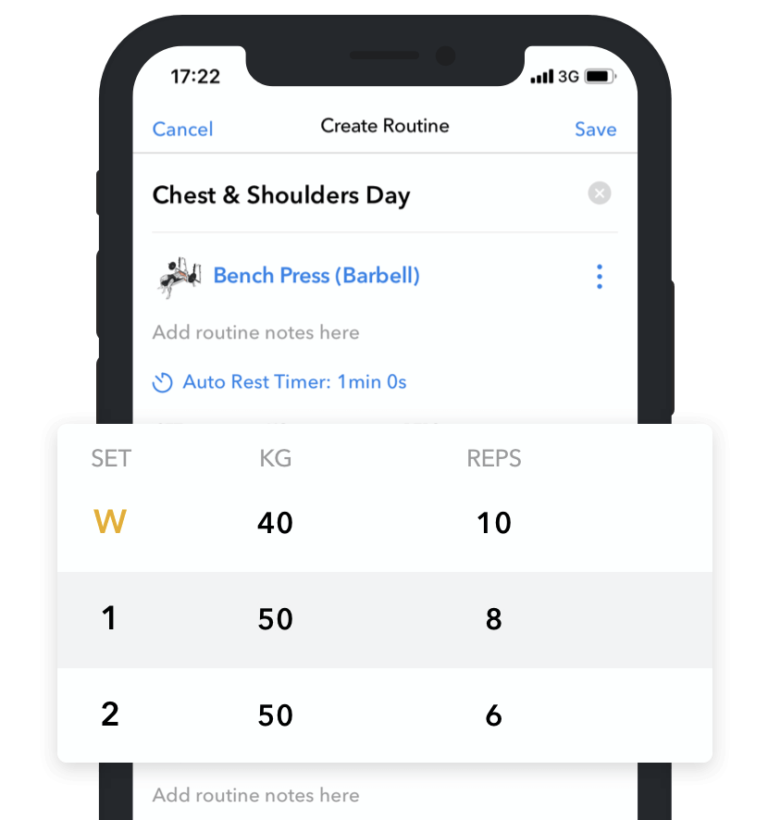
- Plate calculator
- Warm-up set calculator
- Supersets (can include more than two exercises)
- Previous workout values column
- Live activity widgets
- Live PR notifications
- RPE logging
- Automatic rest timers
- Set types (normal, warm-up, drop set, to failure)
- Exercise-specific notes
- Automatic tonnage (volume load) calculations
- Heart rate monitoring (through Apple Watch)
- Exercise demonstration animations & how-to instructions
Progress Tracking & History
- Full access to every completed workout
- Performance on individual exercises (graphs & per-workout)
- Set count per muscle group
- Muscle distribution chart & diagram
- Exercises logged most often
- Monthly report/summary of your training
- Weight, body fat %, and circumference measurement graphs
- Progress photo logging and comparisons
- Workout calendar to track consistency and active streak
- ‘Previous’ performance tab when logging a workout
Social/Community Features
- Find, invite, and follow friends and family
- Discover new athletes
- Like and comment on others’ workouts
- Visit athletes’ profiles
- Compare your progress to others
- Compare your training stats to others with leaderboards
- Share summary illustrations of your workouts outside Hevy
- Upload videos & images with your workouts
- Easily import your Hevy workouts to Strava
Drawback (From User Reviews)
- No option to set different rest timers for one exercise (for instance, one for warm-up sets and one for working sets)
Use Cases
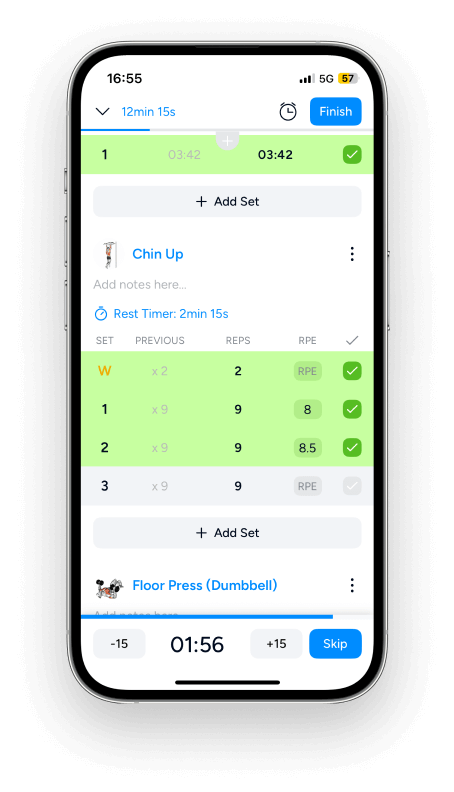
- Create or import a training plan or gym split, do it weekly using the saved templates, and ensure progressive overload by easily reviewing your previous performance and working hard to improve.
- Monitor body composition changes while cutting or bulking by consistently logging your weight, body fat percentage, and circumference measurements, along with progress photos. Combined with workout performance, you can effectively track progress.
- Closely monitor your progress on key lifts and see all your personal records at a glance. Hevy allows you to display all of the relevant information on a graph: 1RM, set/session volume, and reps.
2. Strava: Best Cardio & Endurance Tracking App
Included in Free Version
- Log activities (like walks, runs, hikes, bike rides, and more)
- Explore heatmaps (areas with high activity levels)
- Connect Strava to a heart rate sensor via Bluetooth
- Allow trusted contacts to see your location while exercising
- Connect your Spotify account
- Join clubs
- Participate in challenges
- Private message other Strava members
- See all of your past workouts
- Import your Hevy workouts to your Strava feed
- Connect your fitness device (Garmin, Apple Watch, Oura, Polar, Fitbit, and more)
Paid Version Unlocks
- Set training goals
- Create routes and get recommendations
- Get advanced workout insights
- Access all top performances
- Access your whole training history in one place
- Create challenges for your group
Available On
- iOS
- Android
- Apple Watch
- WearOS
Integrations
- Apple Health
- Health Connect
- Huawei Health
- Samsung Health
- Garmin
- Polar
- Suunto
- Coros
- Wahoo
- Zwift
- Peloton
- Fitbit
- Amazfit
- Oura
Workout Types
The focus is on traditional cardio training (such as running, swimming, and biking), but you can pick from a variety of sports.
Training Programs Included
Multiple running and cycling plans are available with a paid subscription.
One-off Workouts
Yes, you can track and log workouts or activities anytime.
Workout Tools
- GPS tracking (with pace, distance & elevation)
- Heart rate and cadence integration
- Power/wattage support (for cycling)
- Training load analysis
- Weekly and monthly performance summaries
- Gear tracking (bike or shoes used)
- Integration with smart devices (like Garmin, Fitbit, and Polar)
Progress Tracking & History
- Distance, duration, elevation, and activity data
- Progress over a specific period: 7 days, 30 days, 12 weeks, 24 weeks, year-to-date, or all-time
Social/Community Features
- Follow others and build a following
- Give kudos and comment on updates
- Join or create clubs
- Compete with others on leaderboards and segments
- Participate in group activities
- See other users’ profiles and activity history
Drawbacks (From User Reviews)
- Some users have reported incorrect GPS tracking (typically showing less distance passed)
- The app prioritizes and shows ‘active’ or ‘time in movement’ rather than total time spent on an activity once saved
- Some users have reported general glitches, like some workouts not showing up when connected to WiFi, getting an error when trying to activate the free trial, and the routes followed not showing correctly on the map
Use Cases

- Map running and cycling routes and explore new ones when traveling.
- Join local clubs and enjoy group activities, including races. This can be a great way to stay motivated and eager to improve.
- Analyze endurance performance on activities and segments to see if you’re making progress.
3. BetterMe: Best Pilates Fitness & Wellness App
Included in Free Version
- The ability to log workouts
- Access to educational wellness content
- Access to some introductory exercises
- Meal planning tips
“Think of these as a teaser—enough to give you a taste of the app’s functionality but not the entire package.”
Paid Version Unlocks
- Personalized fitness plans
- Personalized meal plans and fasting schedules
- Mental health coaching (including guided meditation)
- Meal suggestions based on goals
- Niche fitness programs like Wall Pilates
- Daily weigh-ins and trends
- Water intake tracking
- Daily step count
- Daily active calories burned tracker (with a goal)
Available On
- iOS
- Android
- Apple Watch
Integrations
- BetterMe Fitness Tracker
- BetterMe Smart Scale
- Apple Health
- Health Connect
- Garmin
- Fitbit
Workout Types
The focus is on functional bodyweight training, such as push-ups, crunches, bird dog, and glute bridges. However, there are also follow-along weight-training workouts with a warm-up and cooldown.
Training Programs Included
BetterMe’s paid version generates workout programs based on goals, experience, preferred exercise frequency, and other factors.
You can also browse the library of existing workouts by categories such as gym, micro sessions, Wall Pilates, and at-home exercise.
One-off Workouts
BetterMe allows you to log one-off sessions by selecting a type and duration. The app automatically estimates the calories burned and adds them to your daily calorie expenditure target.
Workout Tools
- Follow-along function, HIIT, yoga, and mobility workouts
- Pacing and modification options during sessions
- Difficulty that adapts based on progress and feedback
- Video demonstrations
- Daily calories burned goal
- Chat with a coach (depending on subscription)
Progress Tracking & History
- Body weight displayed on a graph
- Starting weight, current weight, and goal weight
- Daily steps taken
- Daily heart rate displayed on a graph
- Sleep duration and quality (with a weekly graph option)
- Time spent exercising daily (graph)
- Daily calories burned (graph)
Social/Community Features
–
Drawbacks (From User Reviews)
- The basic subscription is quite expensive ($19.99/month), and you must pay extra to participate in challenges or get access to a coach
- Difficult to set up streaming on a bigger screen
- Workout programming can be a bit weird in that the app would recommend exercises for the same muscle groups for multiple days in a row
Use Cases

- Start your own fitness journey and learn the basics of structured exercise and proper nutrition without paying for 1-on-1 coaching.
- Set up a preferred fasting schedule and track it through the app.
- Do personalized, at-home follow-along workouts with little to no equipment. This can be a great way to build strength and cardio base, as well as Pilates and yoga skills.
- Build valuable fitness habits like weighing yourself consistently, drinking enough water, and hitting a daily step count target.
4. Nike Training Club: Best Free Follow-Along Workout Classes
Included in Free Version
- Library full of follow-along workouts; browse by category, such as HIIT, yoga, strength, and pilates; apply filters like preferred duration, experience, intensity, and available equipment
- Instructional videos for each prescribed exercise
- Workout reminders
- Achievements & milestones
- Workout streak tracking
Paid Version Unlocks
The app is available for free.
Available On
- Apple Watch
- WearOS
- iOS
- Android
Integrations
- Nike Run Club
- Strava
- Apple Health
- Health Connect
Workout Types
NTC offers workouts for various fitness goals, including bodyweight, Pilates, yoga, HIIT, and some sessions with weights.
Training Programs Included
The app includes several programs, primarily focused on mobility, Pilates, staying fit during and after pregnancy, and foundation-building.
Each plan includes stages to add variety and increase difficulty over time.
One-off Workouts
Yes, you can log any workout from the library anytime.
Workout Tools
- Follow-along workouts with instructions and modifications
- Training plans consisting of multiple stages (weeks)
- Workout time reminders (notifications)
- Video demonstrations of individual exercises (on whiteboard format workouts)
Progress Tracking & History
Monitor your progress on the program you’re following: number of completed workouts, active minutes, and your progress in each stage.
Track the number of total workouts you do, how many times per week you train, and the number of consecutive weeks you stay active.
Social/Community Features
–
Drawbacks (From User Reviews)
- There’s no detailed workout logging option that lets you enter the number of reps, weight, and duration for each set.
- The app recommends reps per set, but it’s up to you to figure out what weight to use
- No progress tracking beyond basic consistency metrics
- No access to advanced workout tools like RPE tracking, automatic rest timers, and supersets
Use Cases

- Get active at home with beginner-friendly, follow-along workouts. The sessions are paced well, and the instructions are clear.
- Dabble in various exercise styles in the privacy of one’s own home to see what feels best. The app offers a variety of workouts, including yoga, Pilates, HIIT, core training, and basic weight routines.
- Enjoy some quick and effective workouts with little to no equipment, perfect if you exercise at home or on the road.
5. Zwift: Best Indoor Cycling & Running Training App
Included in Free Version
- There is no free version of the app; only a 14-day free trial.
Paid Version Unlocks
- Leisurely cycling or running, group activities, and races in a virtual world
- Route options of various lengths, durations, and overall difficulties
- Resistance that adjusts automatically based on the virtual terrain you’re crossing (only with a Zwift-compatible cog)
- Multiple camera angles to track your avatar in the virtual world
- Workout data, such as distance, duration, heart rate, and calories burned
- See other Zwifters who are also working out at the same time
- Guided workouts that account for your experience level and previous performances (based on functional threshold power or FTP)
- Events currently going on or that are about to start; you can freely join the ones you find interesting
Available On
- iPhone
- iPad
- Android phones & tablets
- Apple TV
- Windows PC
- Mac
Integrations
- Garmin
- Wahoo
- Apple Watch
- Apple Health
- Health Connect (through the Zwift Companion app)
- Certain treadmills
- Some runpods (a small device attached to a shoe)
Workout Types
Zwift is designed for running and cycling workouts.
Training Programs Included
Zwift comes with multiple programs; for example, there is Return to Running, which lasts for 8 weeks and steadily increases in difficulty as you improve.
One-off Workouts
You can log workouts anytime; if you stop before completing a workout, your avatar stays in the same place, and you can pick up where you left off.
Workout Tools
- Cycling difficulty that adjusts depending on the terrain (with special Zwift hardware)
- Tracking key metrics like duration, distance, elevation, gait, calories burned, and heart rate
- Get an accurate estimate of your FTP (functional threshold power) by completing Zwift’s dedicated test
Progress Tracking & History
- Access your last 250 activities
- Set and track daily/weekly activity goals
- Fitness trends (active time, distance, and other metrics over a specific period)
- Weekly active streak tracking
All of these options are available through the Zwift Companion app.
Social/Community Features
- Group activities and races that feel motivating because you’re running or cycling along with people from all over the world
- Pick routes and workout types to exercise with others; many are available 24/7 and have a virtual leader who sets the pace and leads the group
- Join clubs (similar to Strava)
Drawbacks (From User Reviews)
- Hardware doesn’t always integrate seamlessly or loses connection randomly
- Some of the icons and text are too small when using the app on a phone
- Some of the integrations and the way workout data is taken from devices are hard to understand
Use Cases

- Power a virtual avatar, make friends, and race with others in fun, engaging indoor cardio sessions.
- Complete part of your cardio training indoors and make it more engaging with Zwift. This is particularly beneficial during the winter months.
- Follow structured, power-based running or cycling programs to improve performance reliably.
6. StretchIt: Best Flexibility & Mobility Training App
Included in Free Version
There is no free version of the app; only a 7-day free trial.
Paid Version Unlocks
- Get personalized stretching and mobility programs for different goals (like alleviating aches, reducing stress, or improving overall mobility)
- Overview of the program schedule with active and rest days
- Upload and compare progress photos
- Attend various classes for different goals (follow-along videos)
- Track active time, calories burned, and the number of points you have
- Start competitions and share the link with friends
Available On
- iOS
- Android
Integrations
- Apple Health
- Apple Music
- Health Connect
Workout Types
The app focuses on flexibility and mobility training, with an emphasis on improving stability, reducing stress, and targeting specific ranges of motion.
Training Programs Included
StretchIt can generate a variety of mobility and flexibility programs based on goals, your preferred length (traditionally a bit longer than one month), weekly frequency, and session duration.
The sessions vary in duration and typically focus on different things to provide well-rounded benefits for the whole body.
One-off Workouts
StretchIt doesn’t provide the option to log one-off sessions like a run or gym workout. It only allows you to complete the scheduled workout according to your plan.
Workout Tools
- Follow-along sessions with commentary and guidance
- Report achievements (e.g., toes to head)
Progress Tracking & History
- Upload and compare progress photos
- See the sessions you’ve completed
- Monitor your active time and total calories burned
Social/Community Features
- Set up or join competitions and invite friends to the app
- Track participants’ progress under Friends Leaderboard
- Join StretchIt competitions and complete workouts to earn points and move up the rankings
Drawbacks (From User Reviews)
- Some users find it hard to find specific stretches to work on a trouble area, such as the hip flexors
- No option to set different reminder times for different scheduled classes
- No option to move around or delete scheduled sessions
Use Cases

- Work toward a specific goal, such as a front or side split, by following the progressive follow-along routines.
- Follow a stretching program aligned with your goals and complete the sessions on your days off from the gym or cardio workouts.
- Learn to do and progress with targeted stretches that help improve flexibility and alleviate pain.
7. Centr: Best All-In-One Fitness, Nutrition & Mindfulness App
Included in Free Version
There is no free version of the app; only a 7-day free trial.
Paid Version Unlocks
- Coached and self-guided workouts
- Self-guided programs
- Additional tailored workouts
- Full programs for different goals
- Recipes with ingredient lists and nutritional info
- Create shopping lists from the app’s recommended meals
- Swap recommended meals with alternative ideas
- Swap a recommended meal with ‘having leftovers’ or ‘eating out’
- Healthy snack options
- Guided meditation and deep breathing lessons
Available On
- iOS
- Android
- Apple Watch
- WearOS
Integrations
- Apple Health
- Health Connect
Workout Types
Centr’s workouts are typically fast-paced and involve multiple movements in a circuit, with little to no rest between sets. The sessions are broken down into rounds.
Training Programs Included
Centr offers multi-week training programs focused on conditioning, plyometrics, cardio, and core, with elements of strength and muscle-building. The workouts are dynamic, circuit, and round-based, with short rest periods between activities.
One-off Workouts
Centr allows you to complete one-off workouts recommended by them. However, the app doesn’t offer the option to log improvised sessions or cardio/sports activities.
Workout Tools
- Log reps and weight per set
- Automatic rest timer
- Demo exercise videos
- Some of the prescribed exercises come with an alternative option
- The required equipment is listed for each upcoming workout
Progress Tracking & History
- “Review Logbook” before workouts to see what you did last time
- Access the calendar where you can see the activities logged on specific days: meals, workouts & mindfulness exercises
- See the current week’s active days at a glance
Social/Community Features
Centr has a Facebook group you can navigate to from the app.
Drawbacks (From User Reviews)
- Users ask for more detailed analytics, such as the ability to track performance on individual exercises
- There’s no option to log RPE or make adjustments to the prescribed workouts (e.g., replace exercises or adjust the rest timer).
- Some users find it difficult to navigate between programs; for instance, if they’ve followed a specific program, it’s unclear what a suitable next plan should be
Use Cases

- Users ask for more detailed analytics, such as the ability to track performance on individual exercises.
- There’s no option to log RPE or make adjustments to the prescribed workouts (e.g., replace exercises or adjust the rest timer).
- Some users find it difficult to navigate between programs; for instance, if they’ve followed a specific program, it’s unclear what a suitable next plan should be.
How to Pick the Right Workout Tracker for You
1. Goal Alignment
Every workout tracker has its pros and cons, so look for one that aligns with your training style:
- Gym/strength training – easy set-by-set logging (reps, weight, and RPE), built-in rest timer, plate calculator, marking sets by type, tracking performance on individual lifts, storing reusable templates to start workouts quickly, custom exercise notes, and more.
Answer: Hevy. The app is free and super intuitive. It includes these and other features that make workout logging and progress tracking a breeze. - Hybrid approach (strength + cardio) – the same features list above with options to log cardio sessions, track distance, monitor heart rate, recommend routes, and similar.
Answer: Hevy (if you want detailed strength training logging and more basic cardio tracking) or Hevy coupled with Strava/Zwift for detailed strength and cardio logging. - Busy beginner or interested in general fitness – brief and guided workouts, built-in programs, clear exercise demos, scheduling and reminders, and basic tracking (like active streak and number of workouts).
Answer: Nike Training Club is a good free option that covers most of these criteria. BetterMe is also a suitable option, but it offers a limited free version. - Endurance athletes – accurate GPS, power, pace, cadence, and speed tracking, reliable heart-rate monitor syncing, performance history, group activities, and integration with devices like Garmin, Apple Watch, and heart rate monitors.
Answer: Strava. The app has a decent free version, and Pro includes all of these features. Zwift is a paid-only platform (a free trial is included) that works well for indoor running and cycling training.
2. Analytics & Progress Tracking
If you’re looking for more basic workout tracking, such as mainly tracking your consistency, a number of apps will get the job done. This includes BetterMe, Nike Training Club, and Centr.
However, if you want more detailed analytics to monitor your performance and key metrics, you need apps like Hevy, Strava, and Zwift. Which one you pick will depend on your workout goals.
Hevy is ideal if you want detailed gym analytics, such as how well you’re doing on individual exercises, how many sets per muscle you do, what muscles you train the most or the least, and how consistent you are, along with a monthly summary.
Similarly, Zwift and Strava track and record relevant cardio metrics to help reliably improve your endurance performance.
3. Social Motivation or a Private Journal
Decide what matters most. Do you want a private logger with a good UI, no distractions, and no social pressure? If so, you can opt for Hevy and simply disable the social aspect. Alternatively, choose BetterMe or Nike Training Club for follow-along workouts with built-in logging options.
However, if you want a social-driven experience with an active feed, options to follow and interact with others, compete, and compare, Hevy is a fantastic gym option. Strava and Zwift are great options for running and cycling with a community aspect.
4. Pricing and What You Actually Get
Ask yourself if you want to pay for an app and, if so, how much? Every app will have at least some features behind a paywall, but some don’t offer anything for free beyond a free trial. Examples include Centr, StretchIt, and Zwift.
Hevy, Strava, and Nike Training Club have great free versions, so consider starting with them based on your workout style and primary goals. You can always get a premium subscription or look for another app to satisfy a specific need.
Features That Actually Matter
It can be hard to tell what features actually matter when browsing potential apps, especially if you’ve never used one before. So here are a few things that genuinely improve workout tracking:
- Easy and quick logging – it can look fine when playing around with the app at home, but the experience can differ significantly when trying to log a session in a crowded gym.
So, prioritize a clean interface with simple logging (what you can do with just a few taps). - Comprehensive exercise library – this is particularly important for gym and bodyweight fitness. The exercises should be named correctly, easy to find, and include instructions (at least written).
Also, the ability to create custom exercises ensures you can address any gaps the library may have. - Edit workouts and programs – training isn’t always predictable. Maybe the gym is crowded, you don’t have enough time for a full session, or you simply want to try something new. You should be able to adjust the workout you’re doing and log only the training you actually complete.
- Integrations that improve the experience – a good integration will reduce friction, not make you juggle more apps and feel overwhelmed. Apple Health and Health Connect are both useful for consolidating your data.
- Offline logging – this isn’t essential, but can be beneficial for frequent travelers and if you generally have spotty internet access.
- Insightful and purposeful analytics – you don’t need an app that tracks everything; that just contributes to a cluttered interface. Use an app that provides the data you need in a clean, understandable format.
FAQ
1. Which workout app is best for strength training?
Hevy is one of the best gym and strength training loggers. With its simple interface, detailed logging, progress tracking, and social features, it lets you log workouts in just a few taps, analyze your performance, and stay motivated.
2. Is it better to use one app for everything or separate apps for cardio and strength?
Apps that focus on one thing are typically better. In contrast, those that try to excel in everything tend to lack essential features and feel cluttered. So, we recommend using separate apps for cardio and strength – for instance, Hevy with Strava.
3. Which workout apps have good social/community features?
Hevy, Strava, and Zwift have great social and community features, including the options to follow and compete with others.
4. What’s the most reliable way to track progressive overload?
A good app will save and present training data in a clean and understandable way, allowing you to track performance on individual lifts. For example, Hevy generates graphs for each exercise and lets you track workout-to-workout performance, and shows previous workout values when logging a live session.
Conclusion
Workout trackers and fitness apps are a dime a dozen. Testing them to find what works best for you can be daunting. We hope our seven recommendations narrow the list and that at least one meets your needs.
Since you’ve made it all the way to the end, download Hevy and log your first workout today.